
Work·Live·Free
 LOGGER근무기록
Records your shifts and works out what you're actually owed.
For foreign workers in Korea, and above all for people on an E‑9 visa.
How to install it:한국어EnglishTiếng Việt中文ไทยBahasa Indonesiaनेपालीភាសាខ្មែរ
- Price
- Free
- Your data
- Stays on your device — no account, no server
- Runs on
- Android, Any web browser
- Languages8
- 한국어 · English · Tiếng Việt · 中文 · ไทย · Bahasa Indonesia · नेपाली · ភាសាខ្មែរ
What it looks like
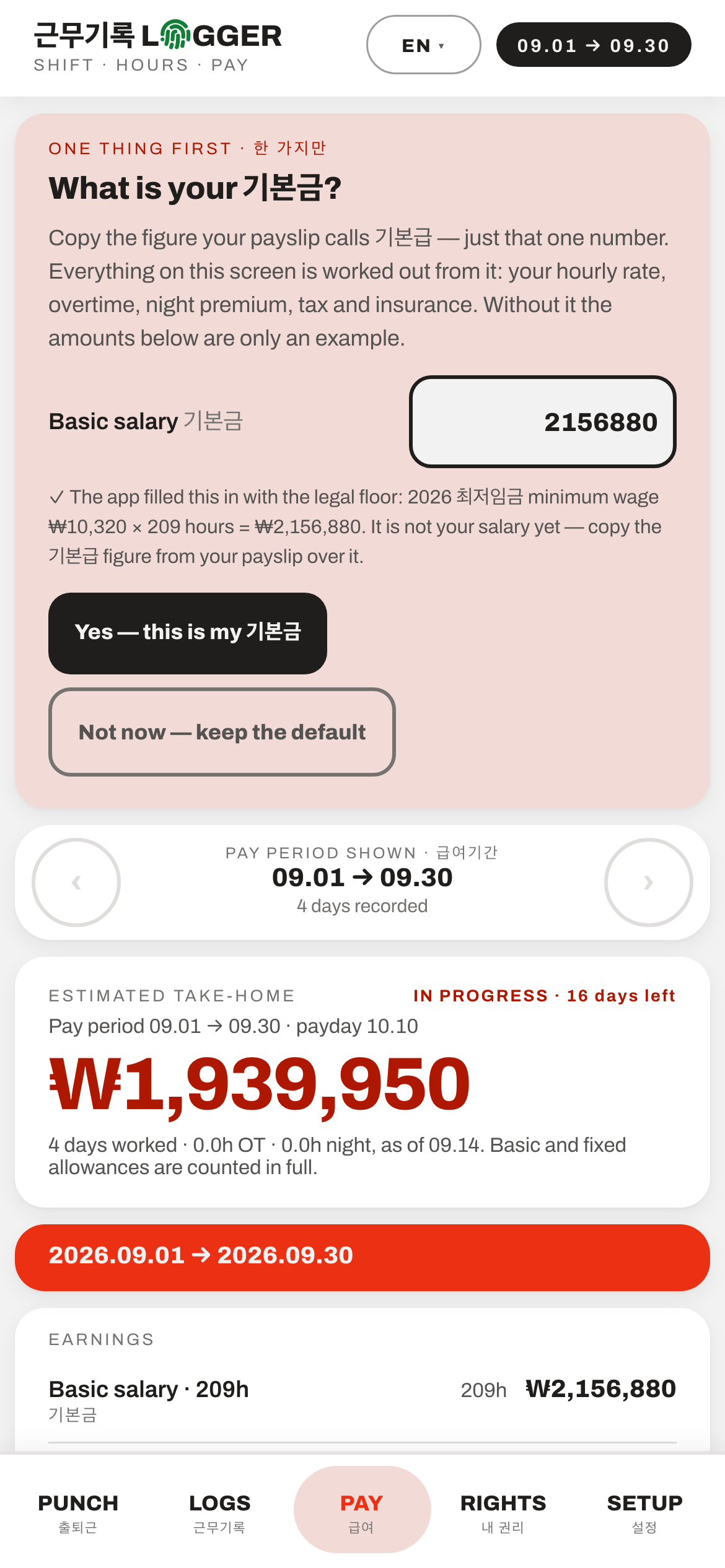
The month, worked out from your 기본급 and shown line by line before payday. The figures are from invented shifts.
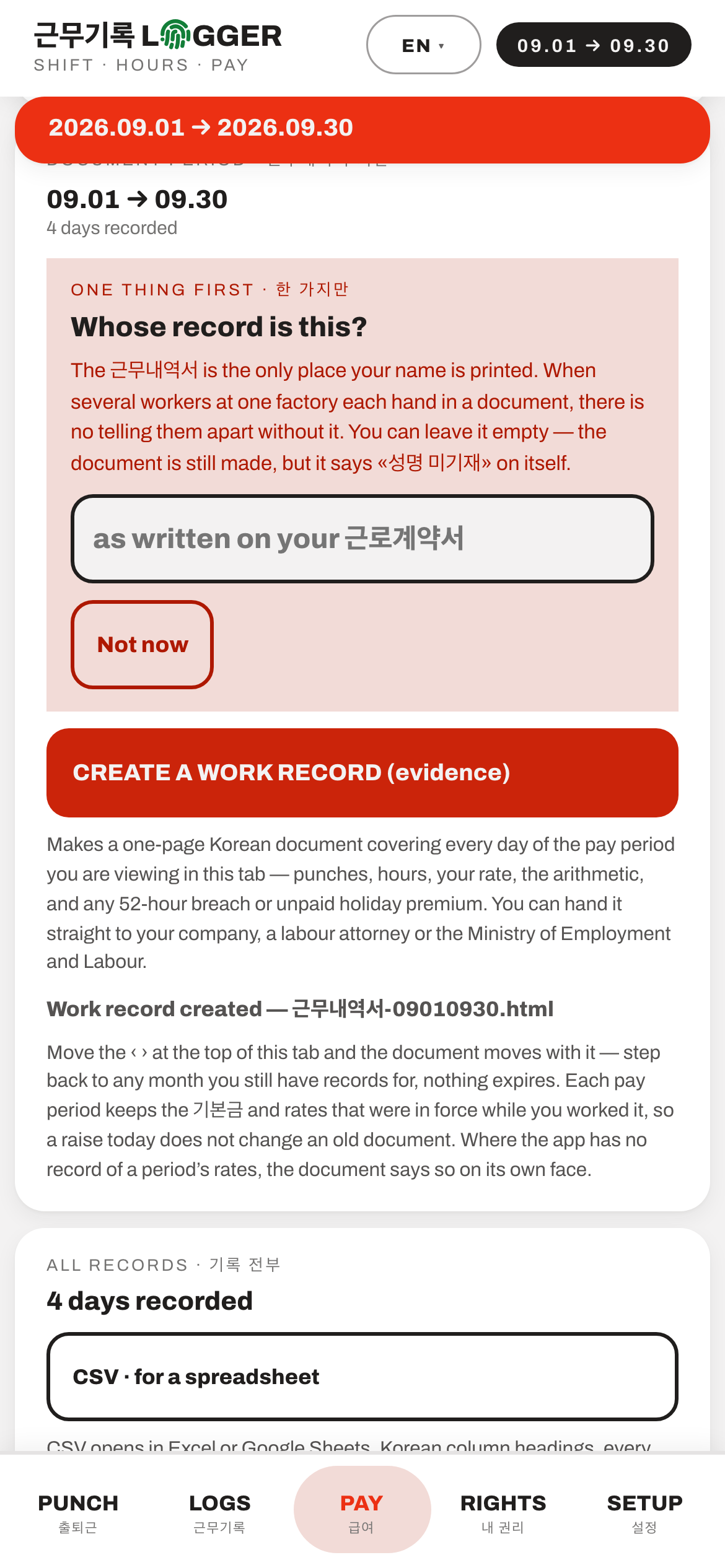
Making the 근무내역서. It asks for your name first, and tells you the document still works without one.
What it does
Payday comes with a 급여명세서 (payslip) in Korean, and a number you cannot easily check. LOGGER gives you your own number to hold it up against.
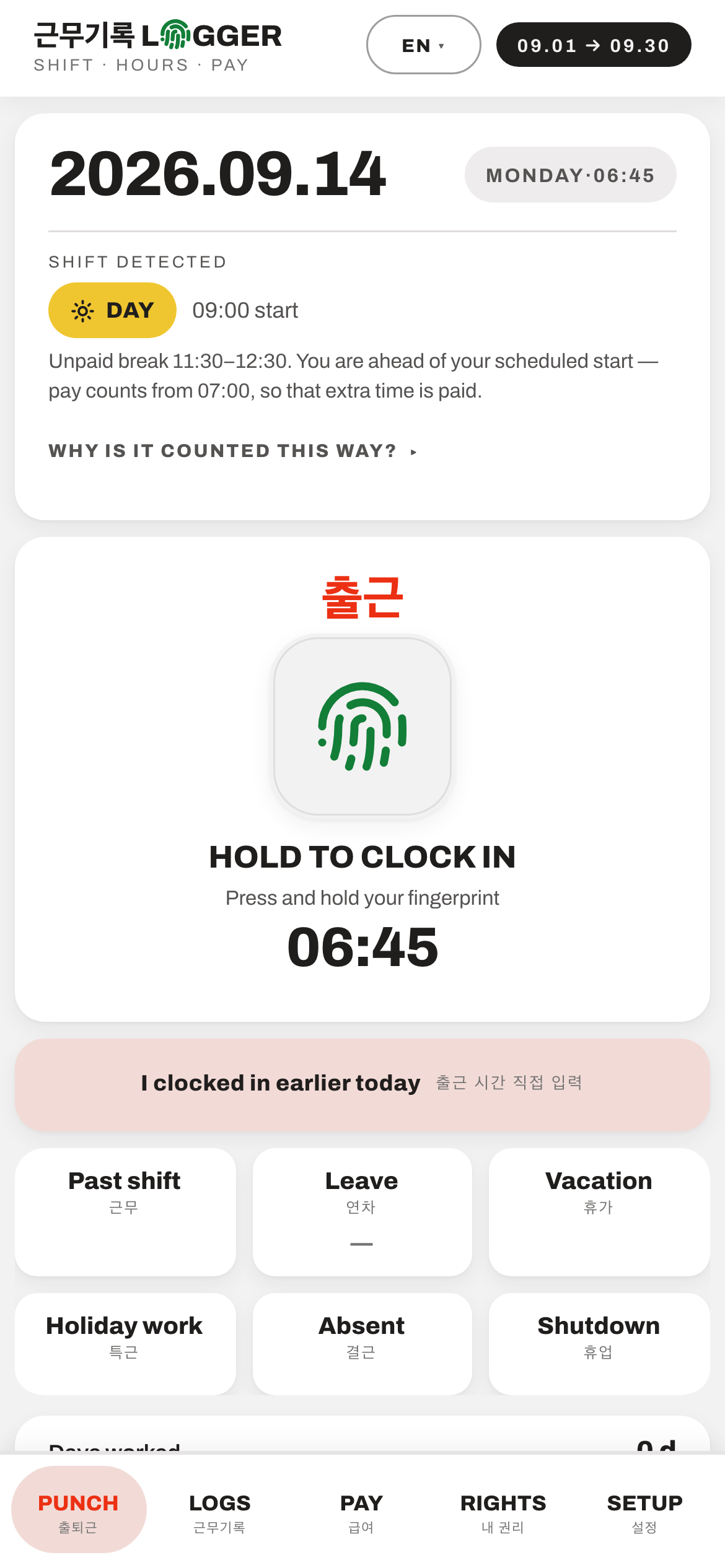
You tap in when you arrive and out when you leave. LOGGER works out on its own whether each shift was a day shift or a night shift, applies the overtime and night-premium rules of the 근로기준법 (Labour Standards Act), and shows you what your month should come to — before payday. It applies these rules the way the law does in the usual case. Two cases differ. At a workplace with fewer than five employees, the law does not require the overtime and night premiums or the 52-hour limit. In farming, livestock and fishing work, the rules on working hours, breaks and holidays do not apply at any size (근로기준법 §63). If either is you, check with ☎ 1350.
It shows you the arithmetic, not just a total — basic pay, 잔업 overtime, 야간 night premium, tax and insurance, line by line, so you can check it against the payslip rather than take its word for it.
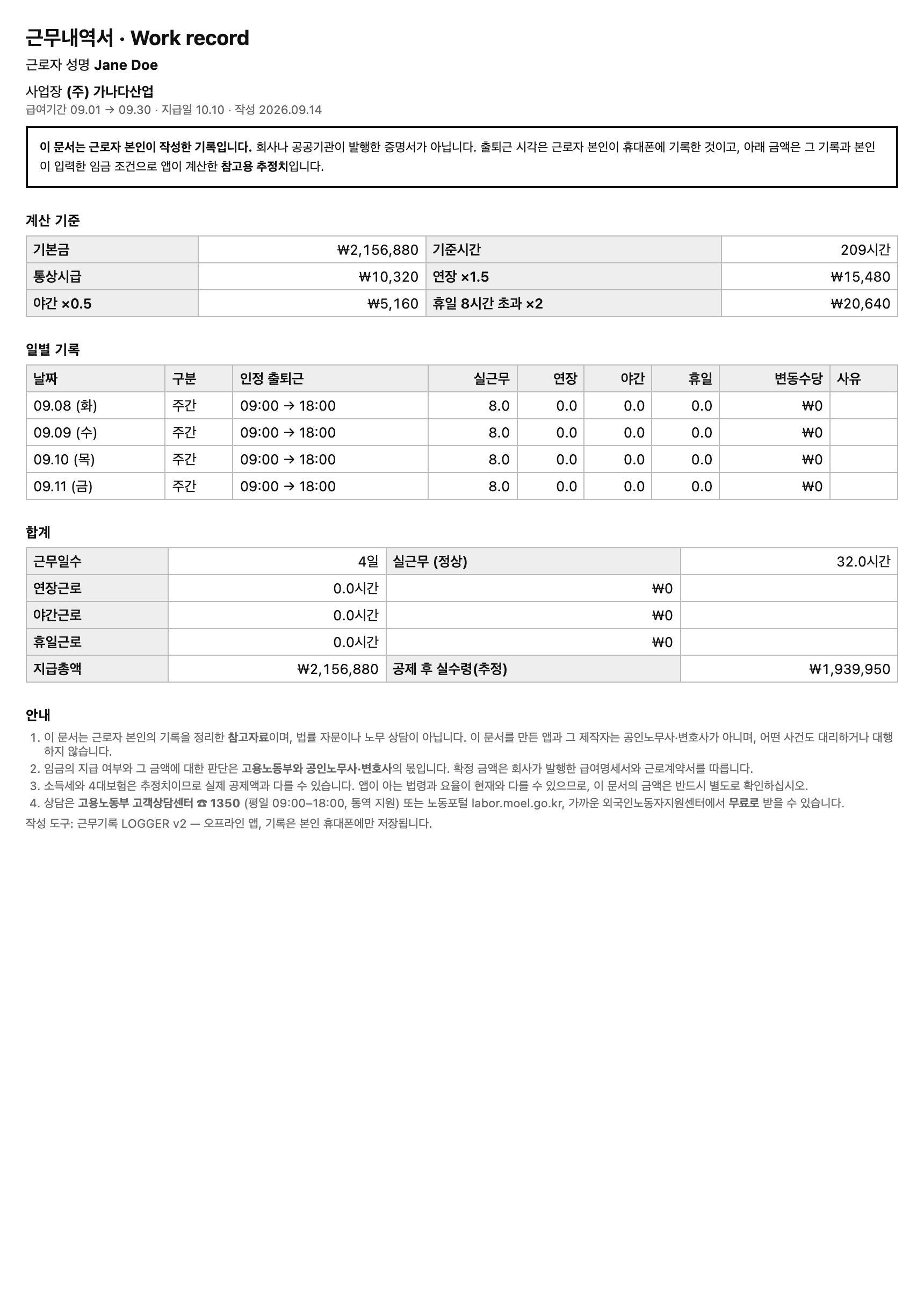
From the 급여 PAY tab it also makes a 근무내역서 (work record): a one-page Korean document covering every day of the pay period — your punches, hours, rate, the arithmetic, and any 52-hour breach or unpaid holiday premium. It is written in Korean whatever language you read the app in, so you can hand it straight to your company, a 노무사 (licensed labour attorney) or 고용노동부 (the Ministry of Employment and Labor). Each pay period keeps the 기본급 (basic salary) and rates that were in force while you worked it, so a raise today does not rewrite an old document.
There is a CSV export beside it for a spreadsheet, and a backup file you can save at any time from 설정 (Settings) › Backup.
It runs entirely on the phone. No account, no sign-up, no internet connection needed after you install it.
It is available in eight languages — 한국어, English, Tiếng Việt, 中文, ไทย, Bahasa Indonesia, नेपाली and ភាសាខ្មែរ — with the Korean payslip terms kept visible next to every translation, so the words on your screen match the words on the company’s paperwork.
Who it’s for
Foreign workers in Korea, and above all people on an EPS E-9 visa — factory, farm, fishing and construction work, paid by the hour, with a payslip written in a language you are still learning. The app speaks eight of the languages E-9 workers arrive with, so you do not need to read Korean to use it.
It is not tied to a visa or an employer. If you work shifts in Korea, are paid by the hour, and want to check the number on your payslip yourself, it is for you.
What it is not
It is a calculator, not a lawyer and not a 공인노무사.
It applies the law to a record you keep yourself and shows you the arithmetic. It does not tell you what to do about the result, it does not draft or file a 진정 (a formal complaint to the ministry) for you, it gives no legal advice, and it is free, which is part of what keeps it a calculator rather than labour consulting.
The binding numbers are the ones on your company’s 급여명세서. Whether wages are actually owed to you is for 고용노동부 and a 노무사 or a lawyer to decide, not for an app.
The 근무내역서 says all of this on its own face. It opens by stating that it is a record written by the worker themselves — not a certificate issued by a company or an agency.
If you need real help, it is free: 고용노동부 고객상담센터 ☎ 1350, weekdays 09:00–18:00, with interpreters. Also the 노동포털 at labor.moel.go.kr, and any 외국인노동자지원센터 (support centre for foreign workers).
Your data
Nothing leaves your phone. There is no server, no account, no telemetry and no analytics — the app’s entire database is your phone’s own local storage. This is not a setting you have to find and switch on; the app has no code that sends anything anywhere.
That is deliberate. A pay record says where you work, what hours you keep and what you are paid — there is no version of this app that needs a copy of that, so it does not have one.
The trade-off is real and you should know it: if you lose the phone or clear the app’s data, the records are gone. Use the backup export in 설정 › Backup, and keep the file somewhere you control.
If your phone has a fingerprint sensor, the punch pad can use it, so clocking in is one touch. The fingerprint never leaves the phone either — the app only ever learns that the check passed.
Where it runs, and what changes
The same app either way.
- Android
- Installs from the file itself, with no store account. Your phone will warn you about installing from outside the store — that warning is normal for anything distributed this way. The records live in the app's own storage, so they survive an update.
- Any web browser
- The same app, opened in a browser. Load it once with a connection and it keeps working offline. The records live in that browser's storage for this address — they do not follow you to a different browser, a different phone, or a different address, so export a backup before you switch.
How to install it, in your language
Step by step, in each language the app speaks. A translation says so at the top if a native speaker has not yet checked it.
한국어LOGGER 설치 방법
이 안내는 AI로 번역했고, 아직 한국어 원어민이 확인하지 않았습니다. 틀리거나 어색한 부분이 있으면 알려 주세요.
Android에 설치
- 이 페이지에서 "Download for Android" 버튼을 누르세요. 파일 이름은 logger.apk이고 크기는 3.8 MB입니다.
- 다운로드가 끝나면 파일을 여세요. 알림에서 열거나, 파일 앱의 Download(다운로드) 폴더에서 열 수 있습니다.
- 휴대폰에 경고가 나타납니다. Play 스토어에서 받지 않은 앱이면 나오는 정상적인 경고입니다. 설정을 누르고 "이 출처 허용"을 켠 다음 뒤로 돌아가세요.
- 설치를 누르세요. 계정도 로그인도 필요 없습니다. LOGGER가 열리면 언어를 고르세요.
- 나중에 업데이트할 때는 새 파일을 같은 방법으로 받아 기존 앱 위에 설치하세요. 기록은 그대로 남습니다.
브라우저에서 쓰기
- "Open in browser"를 누르세요. 처음 한 번은 인터넷이 될 때 여세요. 그다음부터는 인터넷 없이도 됩니다.
- 기록은 그 휴대폰의 그 브라우저에만 저장됩니다. 휴대폰이나 브라우저를 바꾸기 전에 설정 › 백업 › 파일로 내보내기에서 백업 파일을 저장하세요.
EnglishHow to install LOGGER
On Android
- On this page, tap the button that says "Download for Android". The file is called logger.apk and is 3.8 MB.
- When it has downloaded, open it — from the notification, or from the Download folder in your phone's files app.
- Your phone will warn you. That is normal for an app that does not come from the Play Store. Tap Settings, turn on "Allow from this source" (on a phone set to Korean, 이 출처 허용), then go back.
- Tap Install. There is no account and no sign-in. When LOGGER opens, choose your language.
- To update it later, download the new file the same way and install it over the old one. Your records stay.
In a browser
- Tap "Open in browser". Open it once while you have internet. After that it works without internet.
- Your records are kept only in that browser, on that phone. Before you change phone or browser, save a backup file — SETUP › Backup › EXPORT A FILE.
Tiếng ViệtCách cài LOGGER
Hướng dẫn này được dịch bằng AI và chưa được người nói tiếng Việt kiểm tra. Nếu có chỗ nào sai hoặc khó hiểu, hãy báo cho tôi.
Trên Android
- Trên trang này, bấm nút "Download for Android". Tệp có tên logger.apk, dung lượng 3.8 MB.
- Tải xong, hãy mở tệp — từ thông báo, hoặc từ thư mục Download trong ứng dụng quản lý tệp.
- Điện thoại sẽ hiện cảnh báo. Điều này là bình thường với ứng dụng không tải từ Play Store. Bấm để mở phần cài đặt của điện thoại, bật công tắc cho phép cài từ nguồn này (tiếng Anh là Allow from this source, trên điện thoại tiếng Hàn là 이 출처 허용), rồi quay lại.
- Bấm nút cài (Install). Không cần tài khoản, không cần đăng nhập. Khi LOGGER mở ra, hãy chọn ngôn ngữ của bạn.
- Khi có bản mới, tải tệp mới theo cách tương tự và cài đè lên bản cũ. Dữ liệu của bạn vẫn còn.
Trong trình duyệt
- Bấm "Open in browser". Lần đầu hãy mở khi có mạng. Sau đó ứng dụng chạy được cả khi không có mạng.
- Dữ liệu chỉ được lưu trong trình duyệt đó, trên điện thoại đó. Trước khi đổi điện thoại hoặc trình duyệt, hãy lưu tệp sao lưu — CÀI ĐẶT › Sao lưu › XUẤT RA TỆP.
中文如何安装 LOGGER
本说明由 AI 翻译,还没有经过中文母语者核对。如有错误或看不懂的地方,请告诉我。
在安卓手机上安装
- 在本页点击 "Download for Android" 按钮。文件名是 logger.apk,大小 3.8 MB。
- 下载完成后打开文件——从通知栏打开,或在文件管理的 Download 文件夹里打开。
- 手机会弹出警告。不是从 Play 商店下载的应用都会这样,这是正常的。点击“设置”,打开允许从此来源安装的开关(英文是 Allow from this source,韩文手机上是 이 출처 허용),然后返回。
- 点击“安装”。不需要账号,也不需要登录。LOGGER 打开后,选择你的语言。
- 以后更新时,用同样的方法下载新文件,直接覆盖安装。你的记录会保留。
在浏览器中使用
- 点击 "Open in browser"。第一次请在有网络时打开,之后没有网络也能用。
- 记录只保存在这部手机的这个浏览器里。换手机或换浏览器之前,请保存备份文件:设置 › 备份 › 导出文件。
ไทยวิธีติดตั้ง LOGGER
คำแนะนำนี้แปลด้วย AI และยังไม่ได้ให้เจ้าของภาษาไทยตรวจ ถ้ามีตรงไหนผิดหรืออ่านไม่เข้าใจ โปรดบอกฉัน
ติดตั้งบน Android
- ในหน้านี้ แตะปุ่ม "Download for Android" ไฟล์ชื่อ logger.apk ขนาด 3.8 MB
- เมื่อดาวน์โหลดเสร็จ ให้เปิดไฟล์ จากการแจ้งเตือน หรือจากโฟลเดอร์ Download ในแอปจัดการไฟล์
- โทรศัพท์จะแสดงคำเตือน ซึ่งเป็นเรื่องปกติสำหรับแอปที่ไม่ได้มาจาก Play Store แตะ การตั้งค่า แล้วเปิดสวิตช์ที่อนุญาตให้ติดตั้งจากแหล่งนี้ (ภาษาอังกฤษคือ Allow from this source ในโทรศัพท์ภาษาเกาหลีคือ 이 출처 허용) แล้วกดย้อนกลับ
- แตะ ติดตั้ง ไม่ต้องมีบัญชี ไม่ต้องลงชื่อเข้าใช้ เมื่อ LOGGER เปิดขึ้น ให้เลือกภาษาของคุณ
- เมื่อจะอัปเดต ให้ดาวน์โหลดไฟล์ใหม่แบบเดียวกัน แล้วติดตั้งทับของเดิม ข้อมูลของคุณยังอยู่ครบ
ใช้ในเบราว์เซอร์
- แตะ "Open in browser" ครั้งแรกให้เปิดตอนที่มีอินเทอร์เน็ต หลังจากนั้นใช้ได้แม้ไม่มีอินเทอร์เน็ต
- ข้อมูลจะเก็บไว้ในเบราว์เซอร์นั้น บนโทรศัพท์เครื่องนั้นเท่านั้น ก่อนเปลี่ยนโทรศัพท์หรือเบราว์เซอร์ ให้บันทึกไฟล์สำรองข้อมูลที่ ตั้งค่า › สำรองข้อมูล › ส่งออกเป็นไฟล์
Bahasa IndonesiaCara memasang LOGGER
Petunjuk ini diterjemahkan dengan AI dan belum diperiksa oleh penutur asli bahasa Indonesia. Jika ada yang salah atau sulit dipahami, beri tahu saya.
Di Android
- Di halaman ini, ketuk tombol "Download for Android". Nama berkasnya logger.apk, ukurannya 3.8 MB.
- Setelah selesai diunduh, buka berkasnya — dari notifikasi, atau dari folder Download di aplikasi pengelola berkas.
- Ponsel akan menampilkan peringatan. Itu wajar untuk aplikasi yang bukan dari Play Store. Ketuk Setelan, nyalakan tombol yang mengizinkan pemasangan dari sumber ini (dalam bahasa Inggris Allow from this source, di ponsel berbahasa Korea 이 출처 허용), lalu kembali.
- Ketuk Instal. Tidak perlu akun, tidak perlu masuk. Saat LOGGER terbuka, pilih bahasa Anda.
- Untuk memperbarui nanti, unduh berkas baru dengan cara yang sama dan pasang di atas yang lama. Catatan Anda tetap ada.
Di peramban
- Ketuk "Open in browser". Buka pertama kali saat ada internet. Setelah itu bisa dipakai tanpa internet.
- Catatan Anda hanya tersimpan di peramban itu, di ponsel itu. Sebelum ganti ponsel atau peramban, simpan berkas cadangan — PENGATURAN › Cadangan › EKSPOR BERKAS.
नेपालीLOGGER कसरी इन्स्टल गर्ने
यो निर्देशन AI ले अनुवाद गरेको हो, र नेपाली मातृभाषीले अझै जाँचेका छैनन्। कुनै कुरा गलत वा बुझ्न गाह्रो लागे मलाई भन्नुहोस्।
Android मा
- यो पेजमा "Download for Android" बटन थिच्नुहोस्। फाइलको नाम logger.apk हो, साइज 3.8 MB।
- डाउनलोड सकिएपछि फाइल खोल्नुहोस् — सूचनाबाट, वा फाइल एपको Download फोल्डरबाट।
- फोनले चेतावनी देखाउँछ। Play Store बाट नआएको एपमा यस्तो हुनु सामान्य हो। सेटिङ थिच्नुहोस्, यो स्रोतबाट इन्स्टल गर्न अनुमति दिने स्विच खोल्नुहोस् (अङ्ग्रेजीमा Allow from this source, कोरियाली भाषाको फोनमा 이 출처 허용), अनि पछाडि फर्कनुहोस्।
- Install थिच्नुहोस्। खाता वा लगइन चाहिँदैन। LOGGER खुलेपछि आफ्नो भाषा छान्नुहोस्।
- पछि अपडेट गर्दा, नयाँ फाइल यसरी नै डाउनलोड गरेर पुरानोमाथि इन्स्टल गर्नुहोस्। तपाईंका रेकर्ड रहिरहन्छन्।
ब्राउजरमा
- "Open in browser" थिच्नुहोस्। पहिलो पटक इन्टरनेट भएको बेला खोल्नुहोस्। त्यसपछि इन्टरनेट बिना पनि चल्छ।
- रेकर्ड त्यही फोनको त्यही ब्राउजरमा मात्र बस्छन्। फोन वा ब्राउजर फेर्नुअघि सेटिङ › ब्याकअप › फाइलमा निर्यात बाट ब्याकअप फाइल सेभ गर्नुहोस्।
ភាសាខ្មែររបៀបដំឡើង LOGGER
ការណែនាំនេះ ត្រូវបានបកប្រែដោយ AI ហើយមិនទាន់មានអ្នកនិយាយភាសាខ្មែរពិនិត្យនៅឡើយទេ។ បើមានកន្លែងណាខុស ឬពិបាកយល់ សូមប្រាប់ខ្ញុំ។
លើ Android
- នៅលើទំព័រនេះ ចុចប៊ូតុង "Download for Android"។ ឯកសារឈ្មោះ logger.apk ទំហំ 3.8 MB។
- ពេលទាញយករួច សូមបើកឯកសារ — ពីការជូនដំណឹង ឬពីថត Download ក្នុងកម្មវិធីគ្រប់គ្រងឯកសារ។
- ទូរស័ព្ទនឹងបង្ហាញការព្រមាន។ នេះជារឿងធម្មតាសម្រាប់កម្មវិធីដែលមិនមែនមកពី Play Store។ ចុច ការកំណត់ ហើយបើកកុងតាក់ដែលអនុញ្ញាតឱ្យដំឡើងពីប្រភពនេះ (ភាសាអង់គ្លេស Allow from this source លើទូរស័ព្ទភាសាកូរ៉េ 이 출처 허용) រួចត្រឡប់ក្រោយ។
- ចុច ដំឡើង (Install)។ មិនត្រូវការគណនី ឬចូលគណនីទេ។ ពេល LOGGER បើក សូមជ្រើសរើសភាសារបស់អ្នក។
- ពេលក្រោយ ដើម្បីធ្វើបច្ចុប្បន្នភាព សូមទាញយកឯកសារថ្មីតាមរបៀបដដែល ហើយដំឡើងពីលើកំណែចាស់។ កំណត់ត្រារបស់អ្នកនៅដដែល។
ក្នុងកម្មវិធីរុករក
- ចុច "Open in browser"។ លើកដំបូង សូមបើកពេលមានអ៊ីនធឺណិត។ បន្ទាប់មក វាដំណើរការបានទោះគ្មានអ៊ីនធឺណិត។
- កំណត់ត្រារក្សាទុកតែក្នុងកម្មវិធីរុករកនោះ លើទូរស័ព្ទនោះប៉ុណ្ណោះ។ មុនប្ដូរទូរស័ព្ទ ឬកម្មវិធីរុករក សូមរក្សាទុកឯកសារបម្រុងទុកពី កំណត់ › បម្រុងទុក › នាំចេញជាឯកសារ។
Don't take my word for it
What this page claims, and how to check each one yourself.
It cannot send your records anywhere.
The Android app asks for no internet permission at all. Unzip the APK and read its manifest — with that permission absent, Android will not let the app use the network, whatever anybody claims about it.
The browser version is the same app as the download.
Both are built from one source in the same step, and the copy inside the APK is byte-for-byte the file this site serves at /logger/ — the two hash identically.
The APK you download is the file I built.
Hash it before you install it — shasum -a 256 logger.apk on macOS or Linux, certutil -hashfile logger.apk SHA256 on Windows. It must print c180c7398240e4a1b0f1ef572418238253d373ce8d967ab314f3a32f37698dc7. One character out and it is not my build, so delete it. The same hash is on the repo's front page on GitHub, and that is the copy worth trusting — anyone able to swap the file on this site could swap the hash beside it just as easily.
This page is not watching you either.
It loads two scripts from this domain — /motion.js, which tilts the phone on the front page, and /globe.js, which checks whether your screen can draw 3D. If your screen is wide enough to be a laptop or a tablet, /globe.js fetches /three.min.js and /globe-scene.js — a globe on the front page, a drift of lit specks behind every other one. On a phone it fetches /sky-mobile.js instead, about 20 KB, which draws the same specks in a plain 2D canvas, so a handset never downloads the 589 KB library. Nothing is fetched from another domain — three.js is vendored here under its MIT licence. No cookies, no analytics. Open your browser's network panel and count the requests (it shows the sizes compressed, so smaller than these), then read the files — that is the whole of what runs here.